Reading With Perspectives
When you read something on your own, you only get your own point of view. You miss the friend who’d call out the weak argument, the expert who knows the research behind a claim, and the mentor who’d ask what you’re going to do about it. A chatbot gives you one more voice, and only when you stop to ask. An interface that thinks could bring those points of view into the reading itself.
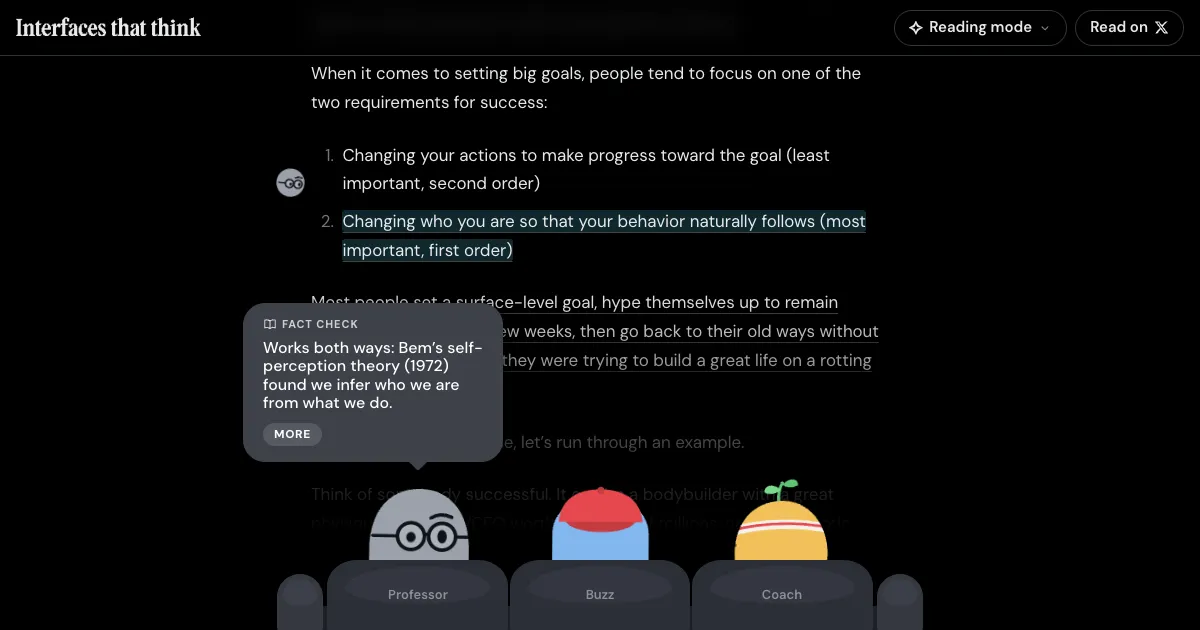
I tried this with Dan Koe’s article How to fix your entire life in 1 day, shown in a minimal black layout. Three AI readers read it with you:
- Professor checks it against the research, books, and history behind its ideas.
- Buzz is your sarcastic buddy, who roasts you like a good friend would.
- Coach relates it to running a company and turns it into one thing to try.
Claude wrote what they say once, ahead of time, so nothing waits on a model while you read.
The first idea is to leave their comments on the document, like annotations.
- Read the discussions. Words the readers commented on are faintly underlined. Click them to open the thread, where the readers reply to each other and sometimes disagree.
- See the reactions. Emoji reactions sit in the margin next to the words, the way they do in Google Docs. Click one to add yours, or select any words to react to them.
The second idea is to make it feel like a group reading along with you, talking about the line you’re on.
- Follow their cursors. Each reader has a cursor in the margin, like a collaborator in Figma. When they have something to say, their cursor moves to the sentence and the remark shows as cursor chat.
- Sit on the reading couch. The readers sit on a couch at the bottom of the screen. When one has something to say about the line you’re reading, they turn around and say it in a bubble. Professor’s fact checks open up to show the research behind them.
The remarks are short and only two readers talk at once, so they add to the reading without taking it over. You can switch between the styles and turn readers on or off from the Reading mode menu. You can also change who a reader is, and they read the article again in their new voice in a minute or two.
Do any of these work? I don’t know. Try it yourself.
 Reading With Perspectives ↗
Try the prototype in your browser. No API key needed.
tareqistyping.com/prototypes/reading-with-more-pov/
Reading With Perspectives ↗
Try the prototype in your browser. No API key needed.
tareqistyping.com/prototypes/reading-with-more-pov/It’s open source on GitHub, so you can add a reader of your own, change how they talk, and see what feels right.